Locked out of my own SonarQube projects
A few days ago a customer contacted me with an unusual request. They have a number of companies that develop software for them, so the permission structure needs to clearly separate one company’s projects from another’s. Neither should be able to see the other’s code. That is quite common and usually not a problem.
What was unusual is that one of those companies will also manage the SonarQube instance for them. It needs to be able to create projects, including its own, and see the code in those. But it must not be able to see the code in the other companies’ projects.
I believed that was possible, but I wanted to be sure, so I tested it in my own demo instance.
The test
I created a couple of groups and added myself to them. I gave elevated permissions to one group in three projects, and removed all other groups and individual permissions from those projects. Those three projects stood in for the other companies’ projects. So when I was a member of the “admin” group, I should be able to create projects but not see the code in those three.
Everything went smoothly and the test worked. I emailed the customer with the results. All cool bananas.
The mistake
Then I decided to clean up. I no longer needed the groups, so I deleted them.
Big mistake.
What I didn’t realise is that those groups held the only permissions left in those three projects. I was an organisation admin, but the projects no longer appeared in my project list, so I had nowhere to click to add permissions back. And one of them was my go-to project for all Sonar Remediation Agent demos. Oops!
The way back
It took me a while, and I only got there with the help of Sonar’s technical support team in Singapore, who pointed me to a section in the SonarQube administration area (Administration → Project management) that lists all projects in the organisation, regardless of whether you have permission to access them. From there I could get to the permissions and give myself access again. Phew!
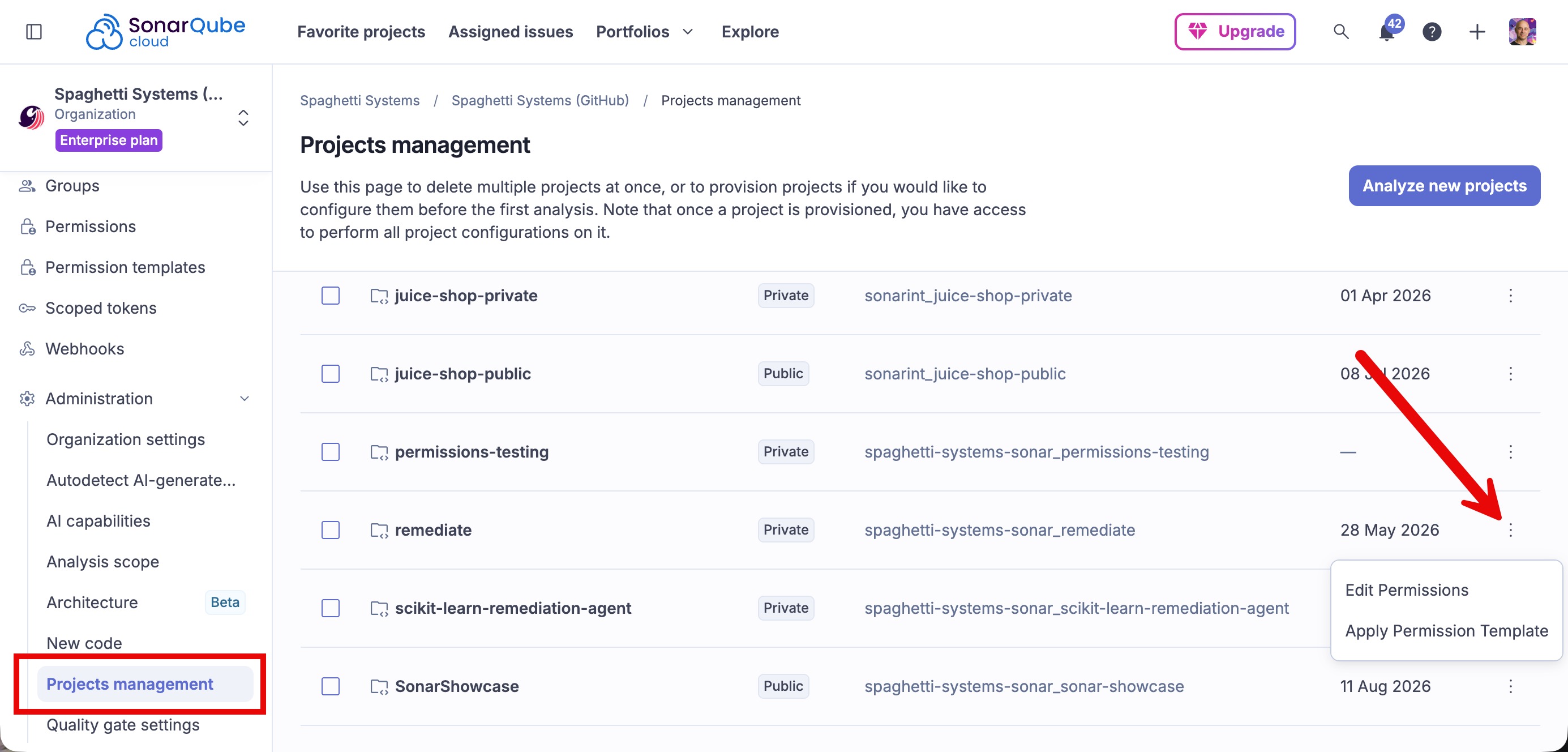 The section that saved me: it lists every project, whether or not you can see it.
Lessons learned
- Don’t use your frequently used projects for testing. Bad things might happen. Create throwaway projects and break those instead.
- Sonar’s support team is amazing. A big thank you to the technical support team in Singapore for getting me out of this hole so quickly.
- Deleting a group also deletes the access it granted. Before you remove a group, check what it is the only holder of. If removing it leaves a project with no permissions for you, you have just hidden that project from yourself.
- Keep a way back in. Make sure at least one account (a break-glass admin, or yourself through a separate path) can always reach every project before you start tightening permissions, and keep it until you are done.
- Admin rights and code visibility are separate, but not a wall. The test confirmed that a group can create projects without seeing code. But as I found out, a full administrator can still find every project and hand themselves access back. So for a setup like my customer’s, who holds the highest admin rights matters just as much as the project permissions.
- Clean up in the reverse order of setup. Restore the permissions first, then delete the temporary groups.
If you have been bitten by something similar, I would love to hear about it in the comments.